mod-tools
| English | 中文 |
ShowUIList
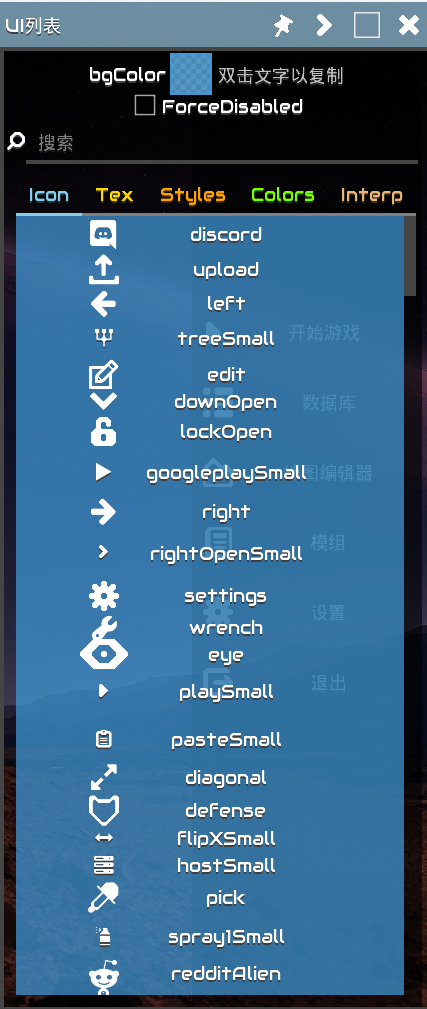
- Display
icon,tex,styles,colors,interps
Tester
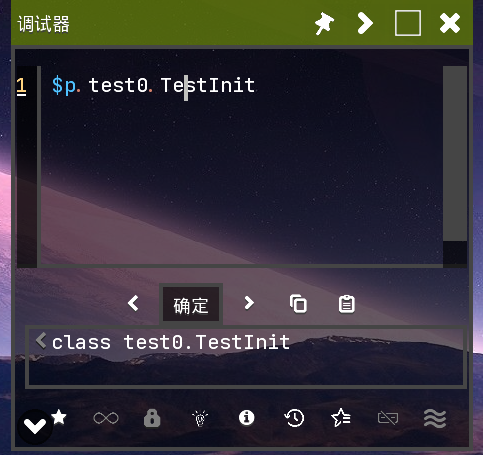
- Provide
JSeditorTester - Shortcuts
- Press
Ctrl+Shift+Entertoexecutecode immediately - Press
Ctrl+Shift+↑/↓to switchhistoryrecords - Press
Ctrl+Shift+Dtoviewdetailed information - Press
Alt+Vto previewTexture
- Press
- Built-in
unsafe,lookup - Built-in
IntFuncclass (Alias as$)
| Alias | Object/Expression | Description |
|---|---|---|
IntFunc |
$ |
- |
$p |
Packages | - |
$.J, $.I, … |
long.class, int.class | Encoding of Primitive Type |
$.long$.int… |
long.class, int.class | - |
$.duo, $.copper |
Blocks.duo, Items.copper | Get a UnlockableContent content by name |
$.items, $.liquids, … |
Items, Liquids, … | - |
$.item(name/id), $.unit(name/id), … |
Content which has the name/id | Get a content by name/id |
$.forEach(list, func) |
for (let v of list) { … } | Mindustry’s RhinoJS is not supported the for-of for java object |
$.toArray(iterable) |
[…iterable] | Convert a object to array |
$.range(int), … (like python) |
a generator (from -> to, step) | Like python |
$.dialog(text/drawable/texture) |
_ | View the text/drawable/texture |
- Code: JSFunc
- Long press on code in the favorites to add to startup items
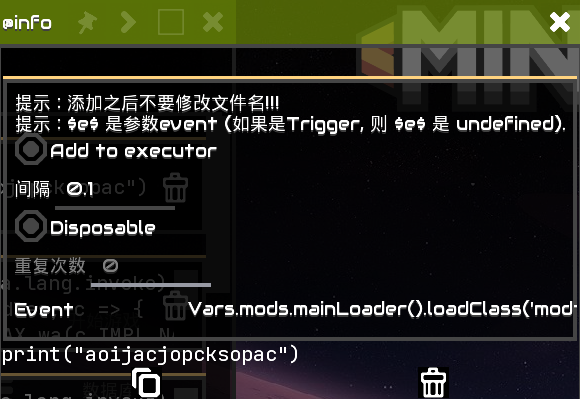
- Quick switch history
$.item,$.liquid,$.unitand so on.
UnitSpawn
- Multiple team selection
- Support for fixed point spawning
- Display
nameandlocalizedName

- R-click/LongPress the name Label to copy save as JS var.
Selection
- Selector
-
Supports
Tile,Building,Bullet,Unit
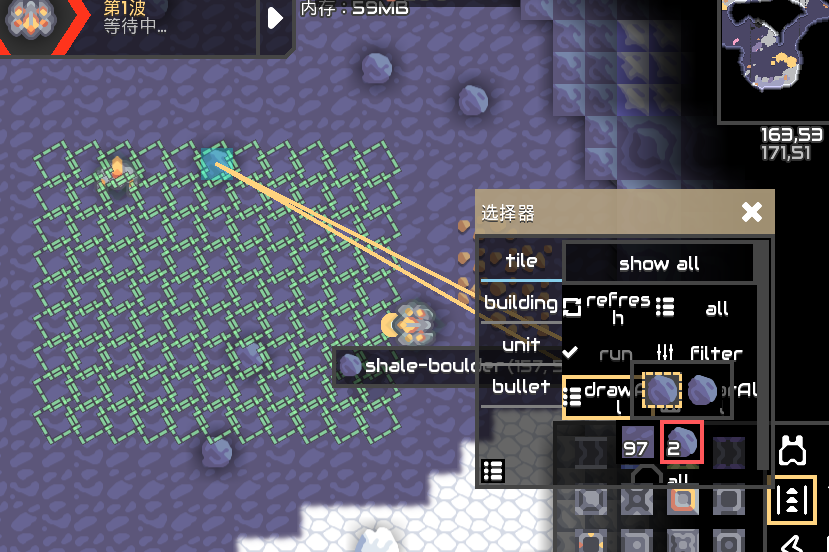
- Press
Ctrl+Altto fix Focus Window
ReviewElement
- Display element list, double-click to copy element to js variable
Ctrl+Shift+Cto Inspect ElementCtrl+Alt+Dto display bounds of Element- Select untouchable elements
- Mobile: Filter current element with two fingers
- PC: Press
Fto filter current element
- Functions shortcuts for Element
i: display details (open ShowInfoWindow)\p(for Image): showDrawablePickerdel: (shiftto ignore confirmation), delete element</>: collapse Groupf: fix floating Info columnr: invoke element’s method
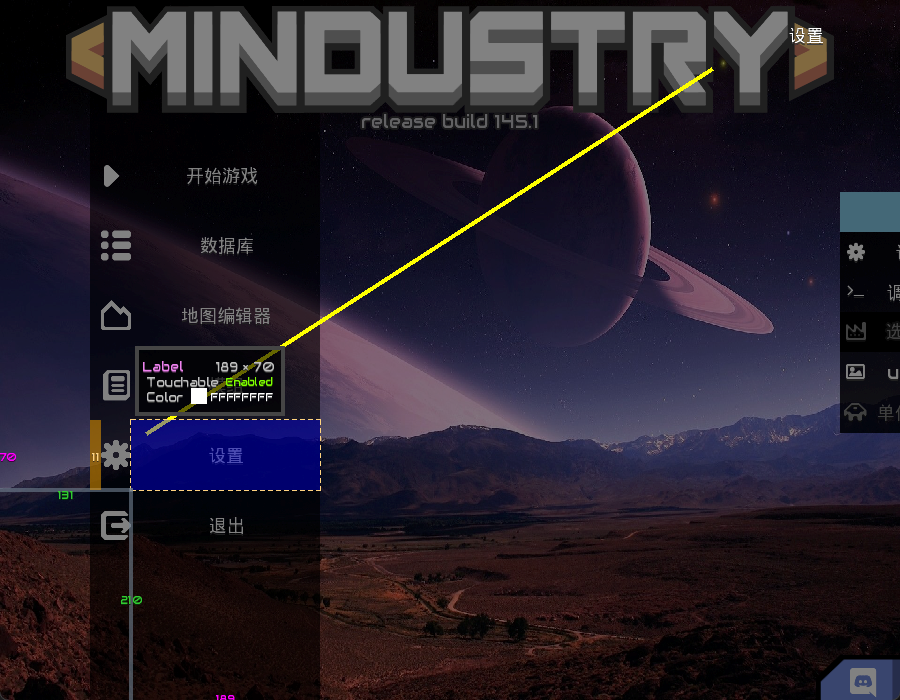
Frag
- Double-click the blue part of Frag to minimize/restore Frag
- In the minimized state, click the blue part, it will behave like a floating ball
Window
- Press
Ctrl+Tabto switch windows - Press
Shift+F4to close current window - RClick the close button to move and scl window.
ShowInfoWindow
'nullrepresentsnullpointer- Press
Ctrl+Fto focus search box - Press
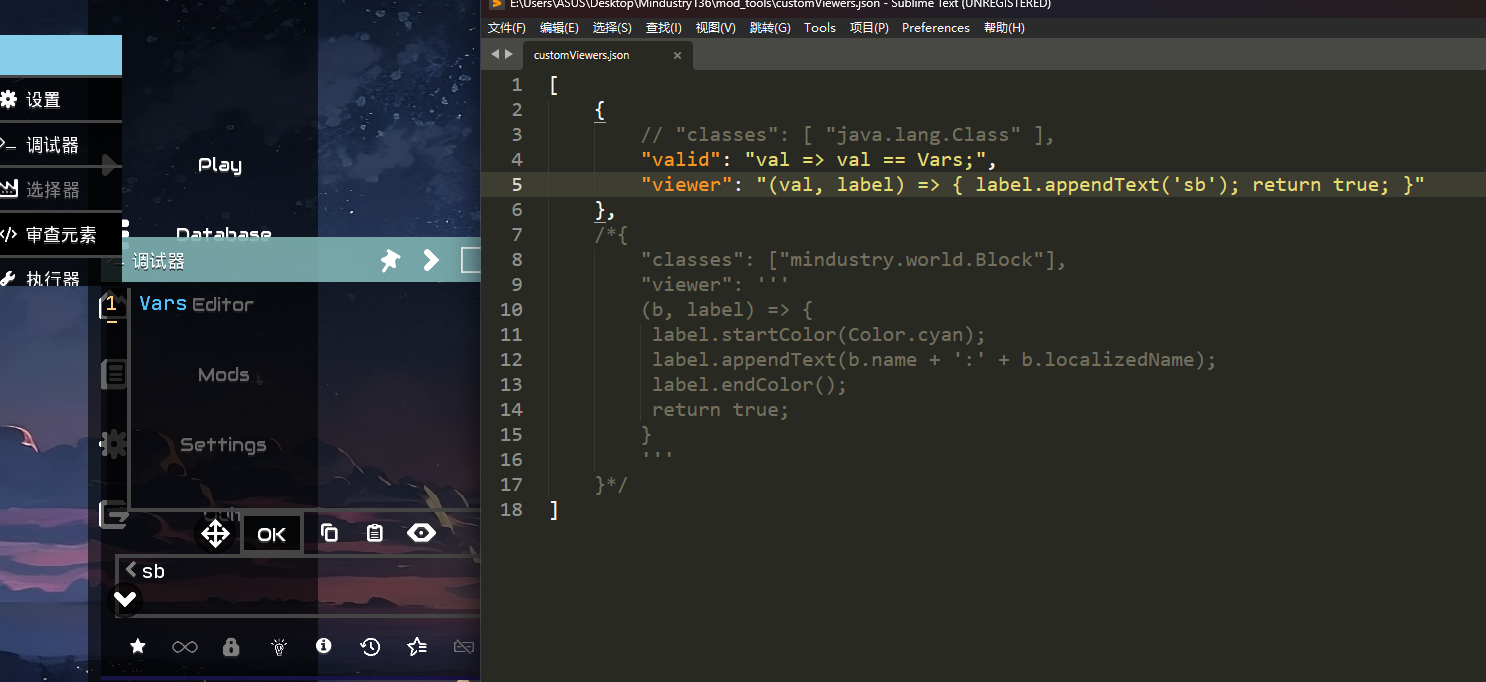
Ctrl+Shift+Fto focus search box and clear search box - CustomViewers (/%MindustryData%/mod_tools)
Others
Extensions
- Override Scene
Replace the original scene, capture rendering errors, may not be good
- Http Redirect
Redirect some websites, such as: github
Configuration file: b0kkihope/http_redirect.properties
HotSwap
Hot-Reload System · Bytecode Enhancement · Lambda Alignment · Instance Tracking · Performance Profiling
1. System Overview
NipX HotSwap Agent is a hot-reload framework based on the Java Instrumentation API. It utilizes the Java Agent mechanism to intercept class loading and redefinition events at runtime, enabling zero-downtime updates for the target application’s code. The entire system is built around a modular design, covering multiple dimensions such as bytecode awareness, difference detection, instance tracking, and performance profiling.
1.1 Core Capabilities
| Capability | Key Class | Description |
|---|---|---|
| Hot-Reload Scheduling | HotSwapAgent |
Monitors file changes and drives the entire reload process |
| Bytecode Enhancement | MyClassFileTransformer |
Injects tracking and performance profiling code during class loading |
| Difference Detection | ClassDiffUtil |
Precisely compares the structure of old and new classes to decide on the reload strategy |
| Lambda Alignment | LambdaAligner |
Solves the issue of synthetic method name mismatches during hot-swapping |
1.2 Module Structure
| Class Name | Responsibility |
|---|---|
HotSwapAgent |
Agent entry point, file monitoring, reload scheduling, the core driver for class redefinition |
MyClassFileTransformer |
ClassFileTransformer implementation, responsible for injecting @Tracker and @Profile code during class loading |
ClassDiffUtil |
A bytecode-level difference analysis tool based on ASM to compare additions, deletions, and modifications of fields and methods, identifying structural changes |
LambdaAligner |
Aligner for Lambda/synthetic method names, establishes a mapping between old and new method names using hash fingerprints to prevent NoSuchMethodError |
MethodFingerprinter |
Method fingerprint calculator, uses CRC64 to hash the bytecode instruction stream, ignoring unstable factors like anonymous class names |
InstanceTracker |
Live instance tracker, uses WeakHashMap to record all instances of classes annotated with @Tracker |
MountManager |
Classpath mount manager, injects the watch directory into the target ClassLoader’s UCP with the highest priority, enabling the loading of new classes |
Reflect |
Reflection utility class, provides low-level class definition capabilities via jdk.internal.misc.Unsafe and IMPL_LOOKUP |
2. Annotation Usage Guide
The system provides 4 annotations as the core API for users. By annotating business code with these, capabilities like tracking, profiling, and reloading can be activated without any invasive code changes.
| Annotation | Target | Description |
|---|---|---|
@Reloadable |
Class-level | Marks the class to be included in the hot-reload process. When the system detects a change in this class’s .class file, it will perform a precise bytecode comparison and redefinition. |
@Tracker |
Class-level | Enables instance tracking. During the bytecode enhancement phase, the system injects a call to InstanceTracker.register(this) into all <init> constructors of the class to record every live instance. |
@Profile |
Method-level | Enables method-level performance profiling. During bytecode enhancement, the system records nanoTime() at the method entry and calculates the elapsed time at the exit, reporting it to ProfilerData.record(). |
@OnReload |
Method-level | Declares a hot-reload callback. After the host class is successfully hot-reloaded, the system will reflectively invoke the method marked with this annotation for post-reload operations like refreshing caches or rebinding state. |
2.1 @Tracker — Instance Tracking
Annotate a class with @Tracker, and the Agent will enhance its bytecode upon startup, automatically calling InstanceTracker.register() every time it is instantiated. In conjunction with InstanceTracker.getInstances(), you can get all live instances at runtime, which is often used for batch-refreshing instance states after a hot-reload.
import nipx.annotation.Tracker;

@Tracker
public class MyService {
    private String config;

    public MyService(String config) {
        // Automatically injected by the Agent: InstanceTracker.register(this)
        this.config = config;
    }
}

// Refresh all live instances after a hot-reload
List<Object> instances = InstanceTracker.getInstances(MyService.class);
instances.forEach(obj -> ((MyService) obj).reloadConfig());
2.2 @Profile — Performance Profiling
Add @Profile to any method you need to monitor, and the Agent will inject timing code at the bytecode level. Note:
@Profileis a method-level annotation, allowing for precise control over the profiling scope.- Profiling data is reported asynchronously via
ProfilerData.record(String, long)and does not block business logic. - The statistics include the invocation count and cumulative execution time for each method, which can be periodically printed or exported.
import nipx.annotation.Profile;

public class OrderService {

    @Profile
    public Order createOrder(String userId) {
        // After the method executes, the duration is automatically reported to:
        // ProfilerData.record("com.example.OrderService.createOrder", duration)
        return new Order(userId);
    }

    @Profile
    public void cancelOrder(long orderId) {
        // Similarly, this method is also profiled.
    }
}
2.3 @OnReload — Reload Callback
When a class is successfully hot-reloaded, the system scans the class and its current live instances, invoking the method annotated with @OnReload. This is used to refresh internal state without restarting the instances.
import nipx.annotation.OnReload;
import nipx.annotation.Tracker;

@Tracker  // Must be used with @Tracker to find live instances
public class CacheManager {
    private Map<String, Object> cache = new HashMap<>();

    @OnReload
    public void onHotReload() {
        // Automatically called after hot-reload is complete
        cache.clear();
        System.out.println("Cache cleared after hot reload");
    }
}
3. How It Works
3.1 Hot-Reload Flow
The entire hot-reload process is divided into the following serialized stages:
| Stage | Step | Description |
|---|---|---|
| ①Sense | File system change monitoring | WatchService listens for CREATE / MODIFY events on .class files, supporting concurrent monitoring of multiple directories |
| ②Read | Bytecode cache update | Reads the new .class file and sends it along with the old version from bytecodeCache to the difference analysis process |
| ③Analyze | ClassDiffUtil.diff() |
Precisely compares additions, deletions, and modifications of fields and methods to determine if Lambda alignment is needed or if it’s a structural change |
| ④Align | LambdaAligner.align() |
If synthetic method names have changed, rewrites the method names in the new bytecode using hash fingerprint matching to prevent NSME |
| ⑤Redefine | Instrumentation.redefineClasses() |
Hot-swaps the aligned bytecode into the runtime using the JVM Instrumentation API |
| ⑥Callback | @OnReload method invocation |
Finds all live instances via InstanceTracker and reflectively calls methods annotated with @OnReload |
3.2 Bytecode Enhancement
MyClassFileTransformer intervenes when a class is first loaded, inserting probe code at the entry/exit points of methods using ASM’s AdviceAdapter. It employs a “pre-emptive exit” strategy: if it detects that the class does not have any of the target annotations, it immediately returns null (without modifying the bytecode), resulting in zero performance overhead for unrelated classes.
// Simplified enhancement logic
if (hasClassAnnotation(bytes, Tracker.class)) {
    bytes = injectTracker(bytes, className, loader);
}
bytes = injectProfiler(bytes, className, loader);  // Method-level scan
3.3 The Lambda Alignment Problem
For each Lambda expression, the Java compiler generates a synthetic private method named like lambda$methodName$N, where N is an internal compiler counter. When the number or order of Lambdas within a method body changes, N will change. This causes the JVM to throw a NoSuchMethodError after hot-reloading because it cannot find the corresponding BootstrapMethod.
LambdaAligner solves this problem with a two-step algorithm:
- Step One (Exact Match): Calculate the CRC64 fingerprint for each synthetic method in both the old and new versions. If the fingerprints are identical but the names are different, create a name remapping.
- Step Two (Sequential Alignment): For methods whose fingerprints do not match (due to logic changes), forcibly align them based on their order of appearance in the file to keep the call chain intact.
3.4 Classpath Mounting
When a brand new class appears in the watch directory, the target ClassLoader’s URLClassPath (UCP) does not contain this directory, so it cannot load the new class. MountManager uses reflection to access the internal fields of the UCP and inserts the watch directory into the path, unopenedUrls, and loaders lists with the highest priority. This ensures that subsequent class lookups can find the new class files.
Note: The mount operation is performed only once (deduplication is handled internally). After mounting, all class files within the target directory become visible to that
ClassLoaderand have higher priority than the original Jar files, thus allowing them to override older versions of classes.
4. Configuration and Startup
4.1 Agent Startup Parameters
(mod-tools will load agent automatically when enabled.)
Attach the Agent Jar to the target process using JVM startup parameters, without any need to modify business code:
# Basic attachment (watching a single directory)
java -javaagent:nipx-agent.jar=watchDir=/path/to/classes \
     -XX:+EnableDynamicAgentLoading \
     -jar your-app.jar

# Monitoring multiple directories (comma-separated)
java -javaagent:nipx-agent.jar=watchDir=/mod1/classes,/mod2/classes \
     -jar your-app.jar

# Debug mode (writes .class files to local disk)
java -javaagent:nipx-agent.jar=watchDir=/path/to/classes,debug=true \
     -jar your-app.jar
4.2 Runtime Switches
HotSwapAgent maintains the following static switches, which can be adjusted in the Agent code as needed:
| Field | Default | Purpose |
|---|---|---|
ENABLE_HOTSWAP_EVENT |
true |
Main switch. If false, the Transformer will not perform any injection logic. |
DEBUG |
false |
Debug mode. If true, the enhanced bytecode will be written to local files for analysis. |
4.3 Class Blacklist
You can add package prefixes of classes that should not be processed to a blacklist by calling HotSwapAgent.addBlacklist(String prefix). This makes the Transformer skip these classes directly, avoiding unnecessary bytecode analysis overhead:
// Add in premain or dynamically at runtime
HotSwapAgent.addBlacklist("com.thirdparty.legacy");
HotSwapAgent.addBlacklist("org.springframework.cglib");
5. Difference Detection in Detail
5.1 The diff() Method
ClassDiffUtil.diff(byte[] oldBytes, byte[] newBytes) is the entry point for difference analysis. It returns a ClassDiff object containing the following information:
| Field | Meaning |
|---|---|
modifiedBodyMethods |
A list of methods whose bodies have been modified (method name + descriptor) |
addedMethods |
A list of newly added methods |
removedMethods |
A list of deleted methods |
changedFields |
Field changes, formatted as "+ fieldName" or "- fieldName" |
hierarchyChanged |
Whether the superclass or interfaces have changed (boolean) |
errors |
A list of error messages for severe incompatible changes |
5.2 Structural vs. Non-Structural Changes
The system categorizes changes into two types with different handling strategies:
Structural Changes (structureChanged() = true):
- Adding a new method or field
- Deleting a method or field
- Changes to the superclass/interfaces (
hierarchyChanged) - → Not supported by standard JVM Instrumentation. Requires DCEVM/HotswapJVM or a user restart.
Non-Structural Changes (only method body changes):
- Modification of method body logic
- Changes to constant values
- Adjustments to control flow
- → Can be directly hot-swapped using
redefineClasses()without a restart.
5.3 Method Fingerprint Algorithm
MethodFingerprinter iterates through a method’s ASM instruction stream, including the opcode, operands, and referenced targets of each instruction into a CRC64 hash calculation. The following are deliberately ignored to improve reload compatibility:
- Line numbers and local variable tables (debugging information)
- The numeric suffix
Ninlambda$xxx$N(an internal compiler counter, handled uniformly byLambdaAligner) - Random numbers in the names of anonymous inner classes / Kotlin Lambda classes (replaced with a
#ANON_N#placeholder)
6. Frequently Asked Questions
Q1: I’ve modified my code, but hot-reloading didn’t work. Why?
Check the following:
- Confirm that the
.classfile was actually written to the monitoredwatchDirdirectory (your IDE might output it to a different path). - Ensure
ENABLE_HOTSWAP_EVENTistrue. - If you’ve added a new method or field, the standard JVM does not support this kind of hot-swap. You’ll need an extended JVM like DCEVM/HotswapJVM.
- Check the
HotSwapAgent.info()logs for[DIFF]output to confirm if difference detection was triggered.
Q2: I’m getting a NoSuchMethodError after hot-reloading. How do I fix it?
This is a Lambda name drift issue. Confirm that LambdaAligner was called during the redefinition process. If the problem persists, you can enable DEBUG=true, which will write the enhanced bytecode to disk. Use javap -c to compare the BootstrapMethods attribute of the old and new versions to find the method name that was not aligned.
Q3: What if the ClassLoader for the code injected by @Tracker is different from the Agent’s own ClassLoader?
The InstanceTracker class needs to be visible to the target class’s ClassLoader. If the Agent Jar is in the BootClassLoader and the target class is in the AppClassLoader, you can add InstanceTracker to -Xbootclasspath/a or use Instrumentation.appendToBootstrapClassLoaderSearch() to append it to the bootstrap classpath.
Q4: How can I view the performance data collected by @Profile?
ProfilerData.record() accumulates data in memory. You can read it in the following ways:
// Print the execution time statistics for all collected methods
ProfilerData.printAll();

// Get the statistics object for a specific method
ProfilerData.Stats stats = ProfilerData.get("com.example.MyClass.myMethod");
System.out.println("avg: " + stats.avgNanos() + "ns, count: " + stats.count());
Q5: How does the system handle changes in the inheritance hierarchy?
ClassDiffUtil will mark this change as hierarchyChanged = true and record an error like "! CRITICAL: Superclass changed" in the errors list. By default, the system will not perform redefineClasses on a class whose inheritance has changed (as it’s not supported at the JVM level). It will log a warning, prompting the user to restart the application.
7. Advanced Usage
7.1 Manually Triggering a Reload
Besides being automatically triggered by file monitoring, you can also programmatically trigger a reload for a specific class:
// Read the new bytecode and manually trigger a reload
byte[] newBytes = Files.readAllBytes(Path.of("/path/to/MyClass.class"));
HotSwapAgent.redefineClass(MyClass.class, newBytes);
7.2 Extending the ProfilerData Storage Backend
By default, ProfilerData stores statistics in a ConcurrentHashMap. If you need to push data to a monitoring backend like Prometheus or InfluxDB, you can extend ProfilerData and override the record(String, long) method, or use a periodic task to read and batch-upload the data.
7.3 Custom Blacklist Strategy
The default implementation of isBlacklisted() uses prefix matching. If you need more complex filtering (e.g., regex, containment), you can modify the logic in HotSwapAgent or provide a custom Predicate<String> to be injected into the system.
Tip: It is recommended to use
@Profilein production environments only during performance testing or diagnostic phases. Once diagnostics are complete, remove the annotation and redeploy to eliminate the minor performance overhead introduced by bytecode injection.